One bill, counted once
Car insurance appears under Insurance and Automobile. Pick the heading that works for you and keep one bill. The app shows related bills and checks for matching entries.
 myBudgetCanvasGet support
 Recurring costs
Track online and physical subscriptions and other household commitments without treating a schedule as a completed payment.
Eight starting points
Select a main category to see its subcategories. These are choices in the current app build, ready for your own bill amounts and dates. Available to installed apps with a future update.
Choose a subcategory, then add the details from your bill.
Car insurance appears under Insurance and Automobile. Pick the heading that works for you and keep one bill. The app shows related bills and checks for matching entries.
Name each home or rental, then allocate its mortgage, utilities, insurance, rates and maintenance separately.
Give each car a distinct name and record its loan, registration, insurance, servicing and other costs.
Each bill stores an amount, due date and payment frequency. Category choices do not create spending; recording a payment does. Existing records remain available.
Subscriptions made easier to review
Search TV, movie, documentary, anime, international and sports services. Choosing one fills the title and provider; you enter your actual amount, due date and frequency.
Includes Netflix, Stan, Disney+, Apple TV, Prime Video, HBO Max, BINGE, Kayo Sports and more. Bundle notes help you avoid recording the same charge twice.
Australian catalogue checked 5 October 2026. Enter any other service manually. Prices and subscriptions are not imported.
Choose whether to record your App Store subscriptions and receive a reminder to review them.
Reviews are manual and reminders are optional. The app cannot read other apps’ subscriptions or automatically detect changes. Review preferences stay on your device.
Inside the app
The real Subscriptions & bills screen shows each saved schedule, its next expected date and the explicit action that records an actual payment.
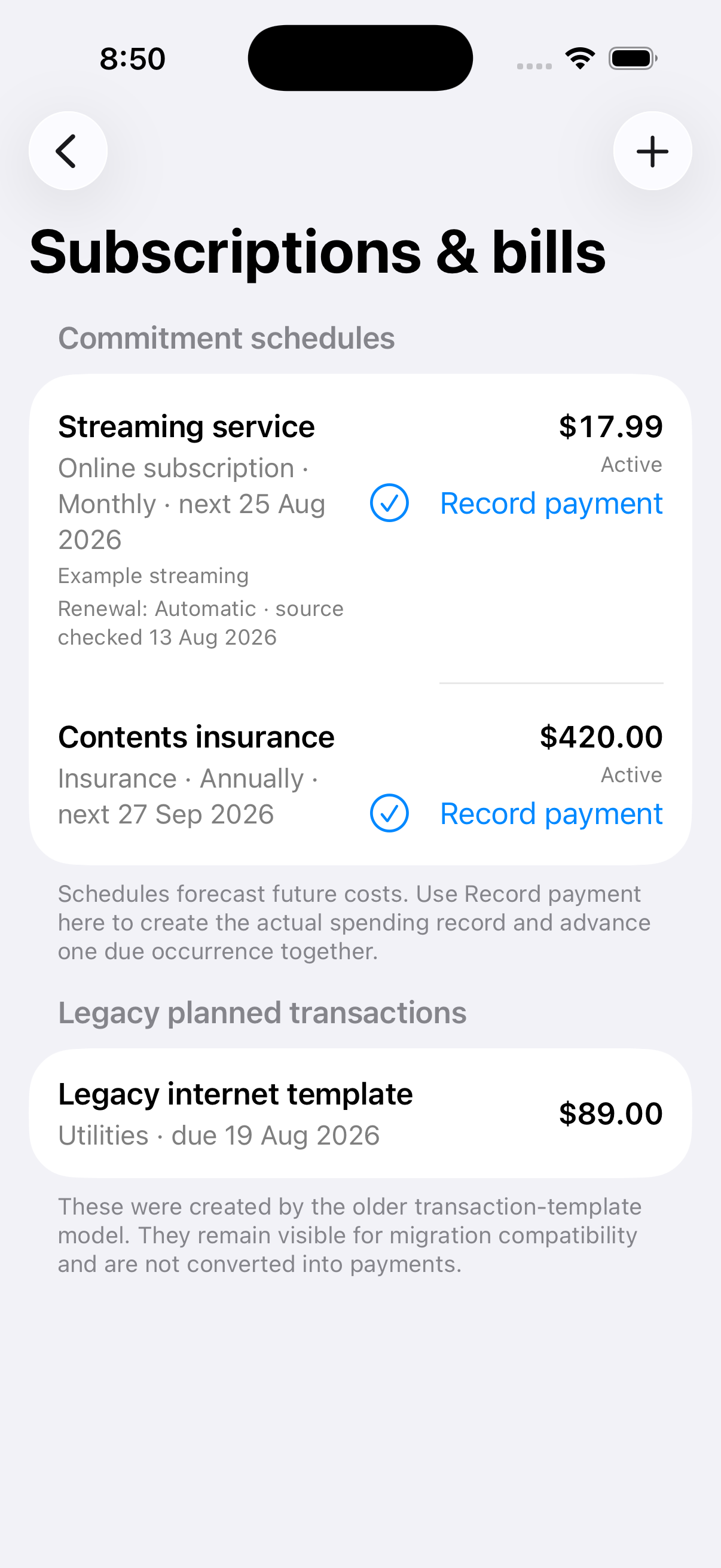
Choose the category and subcategory, name the property or car if relevant, then enter the amount, due date and payment frequency.
Keep the expected date visible and optionally prepare a privacy-reduced reminder handoff.
Link the actual expense so reports count real spending once.
Supported commitments
Rent, mortgages, utilities, insurance, rates, body corporate, maintenance and general living costs can all sit beside online and physical subscriptions.
The current reminder bridge projection excludes amount, currency, account, provider, property, receipt, URL, credential, budget and payment state. Delivery is opt-in and best effort; it does not guarantee a reminder by a particular time.